Repositories
Introduction
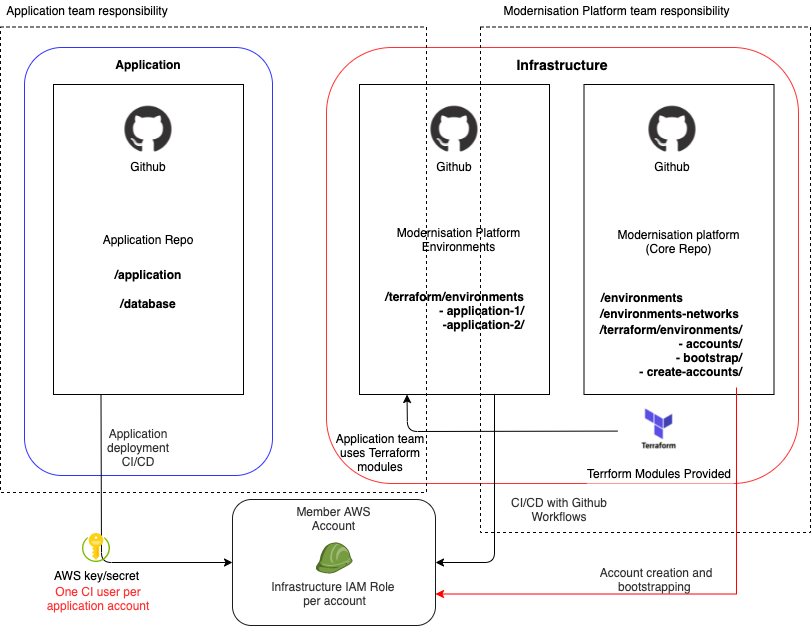
There are two main repositories for the Modernisation Platform:
modernisation-platform
This contains our core infrastructure, Architecture Decision Records (ADRs), user guidance, user environment creation and networking definitions and core workflows.
modernisation-platform-environments
modernisation-platform-environments
This contains user environment resources and workflows. This repo exists so users can easily find and amend their infrastructure in one place, and the Modernisation Platform team can clearly separate user and core code and workflows.
Other repositories
modernisation-platform-ami-builds
modernisation-platform-ami-builds
Repository for creating pipelines to build AMIs for use on the platform.
modernisation-platform-configuration-management
modernisation-platform-configuration-management
Repository for configuration management code used on the platform.
We also have repositories for Terraform modules, these modules are an easy way to build up your infrastructure with sensible defaults and we would encourage you to use these where possible. You can see a full list of these repositories in the modernisation-platform readme.
Commit Signing
With the exception of modernisation-platform-environments, all of our managed repositories enforce the use of signed commits when merging to the main branch. For further information please refer to the official github documentation here.
Creating new GitHub Repositories
All of our GitHub repositories are defined as code using Terraform in the Modernisation Platform Repository.
To add a new repository with correct default security settings, follow the steps outlined below:
Create a PR and define the new repository in the repositories.tf Terraform file. Ensure that the standard naming convention is followed and labels are used for the repository type and search keywords.
Add the module name to the local modernisation_platform_repositories, keeping the list in alphabetical order for ease of reference. This will ensure the new repo will inherit the standard security permissions for the team.
Create a PR on the modernisation-platform repo and add the module name to the github_actions_read_secrets role. This will ensure the repo has access to download secrets required for GitHub workflows running unit tests.
The new repo will be generated by the Terraform: Github Resources workflow.
If the new repo is missing any necessary settings, check again that the repo was added correctly to the local in 2 above.
Diagram